How to Get Your AMSA CoST Card: myAMSA Online Application & Form 419 Step-by-Step Guide
Last updated: August 2026
You’ve finished your STCW – AMSA Certificate of Safety Training (CoST) course. Congratulations — the hard part is done. Your STCW Statement of Completion is issued straight away, which means you can start applying for superyacht and international vessel work immediately.
But if you want to work on Australian-flagged commercial vessels, there’s one more step: applying to AMSA for your Certificate of Safety Training (CoST).
There are now two ways to do this. As of 18 August 2026, you can apply online through AMSA’s myAMSA portal — upload your documents, pay online and track your application from a secure account. The traditional route, Seafarer Form 419 lodged at Australia Post, still works exactly as it always has.
This guide walks you through both. It also includes a downloadable sample Form 419 — filled out with example details — so you can see exactly what to enter (and what to leave blank) if you’re taking the paper route.
What Is the AMSA CoST Card?
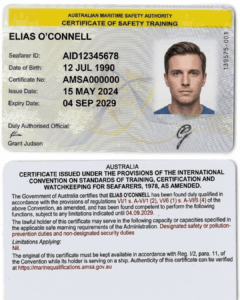
The Certificate of Safety Training (CoST) is issued by the Australian Maritime Safety Authority (AMSA) and is the legal requirement for working on Australian commercial vessels. It confirms you have completed AMSA-approved STCW Basic Safety Training.
Your training provider issues your STCW Statement of Completion when you finish the course — but only AMSA can issue the CoST itself. That’s why you need to lodge a formal application after your course.
One important note before we start: AMSA does not accept STCW Basic Safety courses completed overseas, or from colleges within Australia that are not AMSA approved. This is why it matters that you train with an AMSA-approved provider — the STCW – AMSA CoST course at Superyacht Crew Academy is AMSA approved, so your Statement of Completion is accepted for this application.
Two Ways to Apply (New from 18 August 2026)
Until recently there was only one way to get your CoST: complete Seafarer Form 419 and lodge it in person at Australia Post. From 18 August 2026, AMSA has opened a second, faster route — you can apply, or revalidate, online through the myAMSA portal.
Apply online through myAMSA if: you’re in Australia, you have (or can set up) a myID Digital ID at Standard identity strength, and you’d rather not make a trip to the post office.
Use Form 419 if: you’re already overseas, you can’t set up a myID, or you’d simply prefer the traditional paper lodgement. This route is unchanged and still fully valid.
Both routes cost the same $112 and both are assessed within the same 28 business days. The difference is convenience — with myAMSA you can submit at any hour, upload your documents digitally, and watch your application’s progress instead of wondering.
Because the online CoST service is brand new, AMSA is actively gathering feedback during its first month of operation. If you apply online, there’s a short survey afterwards — it’s worth the few minutes.
Option 1: Apply Online Through myAMSA
What you need before you start
A myID Digital ID at Standard identity strength. myID is the Australian Government’s secure digital identity app, managed by the ATO. It lets you prove who you are online using Australian identity documents such as your passport or driver’s licence — which is what removes the need to have your ID sighted in person. If you don’t already have one, set it up at myid.gov.au. Standard strength is the minimum required; reaching it generally means verifying two Australian identity documents. Don’t leave this to the last minute — if a document doesn’t match, verification can take a day or two to sort out.
A myAMSA account. Once your myID is working, create your myAMSA account. AMSA’s setup guidance is at amsa.gov.au/about/myAMSA. Log in once before you’re ready to apply, so you hit any snags on a quiet evening rather than when you’re trying to submit.
A digital copy of your STCW Statement of Completion. You’ll upload this rather than hand over a photocopy, so have a clear scan or photo saved to your phone or laptop. It needs to show your STCW course codes — course completion certificates, not transcripts, attendance records or statements of attainment.
A recent digital passport-style photograph. Keep one saved and ready in case the portal asks you to upload one — you won’t have the free Australia Post photo on this route.
The $112 application fee, paid online as part of the application.
You do NOT need a Certificate of Medical Fitness. Same as the paper route — a medical is not required for the issue of a Certificate of Safety Training.
What happens
Log in to myAMSA using your myID, work through the CoST application, upload your supporting documents and pay. You can start, save and submit in your own time, and track the application’s progress from your account rather than waiting on the post. AMSA also sends status updates by email or SMS.
Once your application is approved, you receive a digital certificate, which you can download to your phone’s digital wallet for easy access. Your digital CoST carries the same status as a plastic CoST card and includes a QR code linking to AMSA’s verification service, so employers, inspectors and surveyors can confirm it’s authentic, current and valid.
If you run into trouble at any point, AMSA Connect is on 1800 627 484 and staff can walk you through it.
A note for overseas applicants
myID relies on Australian identity documents, so if you’ve already headed overseas for the season, the Form 419 email route below remains the reliable option. If you’re still in Australia but leaving soon, it’s worth setting up your myID before you fly.
Option 2: Apply Using Seafarer Form 419
This is the traditional route: complete Form 419 online, print it, and lodge it in person at a participating Australia Post outlet (or by email if you’re overseas). It remains completely valid, and it’s the route to use if you don’t have a myID or you’re already abroad.
What You Need Before You Apply (Form 419 Route)
Before starting your application, have the following ready:
- Your STCW Statement of Completion from your AMSA-approved training course, covering all five modules: personal survival techniques, fire prevention and firefighting, elementary first aid, personal safety and social responsibilities, and security awareness training. You’ll provide a copy of this with your application — AMSA asks that you do NOT hand over originals of supporting documents, and accepts no responsibility for lost originals.
- Proof of identity — see the ID options below. Unlike your supporting documents, your ID must be original documents, presented at Australia Post when you lodge.
- The application fee — currently $112 for the Certificate of Safety Training (check the AMSA website for the current fee, as these are updated from time to time). You pay at the post office when you lodge, or online if applying from overseas.
- You do NOT need a Certificate of Medical Fitness for this application — the form states this explicitly, so don’t let anyone tell you otherwise.
- Your photo is taken at Australia Post when you lodge, at no extra cost — so no need to organise passport photos in advance if you’re applying in Australia.
What ID Can You Use?
You must choose ONE of these five identity document options:
- Your current passport
- Your current Australian driver’s licence + your full Australian birth certificate or Australian citizenship certificate
- A photographic ID issued by an Australian government agency + your current Medicare card + your full Australian birth certificate or citizenship certificate
- Your current Medicare card + a bank account card showing your signature + a proof-of-age or student ID card showing your photograph + your full Australian birth certificate or citizenship certificate
- Aboriginal and Torres Strait Islander people — a copy of your birth certificate, or the alternative documents AMSA lists (including Identity Declaration Form 162)
If the name on your ID doesn’t match the name on your application, you must provide change of name evidence. And remember — your certificate will be issued using your name as it appears on your Proof of Identity document, so enter your name on the form exactly as it appears on your ID.
Step 1: Complete Seafarer Form 419 Online
Form 419 is completed on the AMSA website here: AMSA Seafarer Form 419
Important: all of your details are entered onto the form online. You can only download and print the form once every required field is complete. You cannot print a blank form and fill it in by hand.
The form is interactive — it generates a checklist of supporting documents based on what you select. AMSA’s instruction is clear: do not proceed with an application if you do not have a checklist generated with the form. Selecting the wrong application type can delay your assessment, so follow the steps below carefully.
Before you start
Read the introduction on the AMSA page first, then click the “Access and download form 419” button.
To make this easier, we’ve prepared a sample Form 419 completed with example details for a first-time Certificate of Safety Training application. Download it and keep it open beside you while you complete your own form online.
Download the Sample Form 419 (PDF)
This sample is for reference only. You must complete your own form online at amsa.gov.au — the printable version only becomes available once your details are entered. Form shown is Version 2 7/28; AMSA updates the form from time to time, so always work from the current version on their website.
Application type
Select “Initial issue of a certificate and/or endorsement” — this is the correct option for the initial issue of a Certificate of Safety Training.
You do NOT need a sea service assessment — that requirement applies to Certificates of Competency, and the form notes that separate sea service assessments are not necessary for Ratings.
Personal details
- Seafarer ID — leave this blank. This is your first application, so you don’t have a Seafarer ID yet. AMSA will issue you one — for future applications (like your revalidation in five years) you’ll have a number to enter here.
- Enter your Title, Surname and ALL Given Names exactly as they appear on your ID. Don’t worry if the name on your course certificate is shorter than the name on your ID — course completion statements are accepted, and it’s your ID that determines the name on your certificate.
- Select your Nationality from the list.
- Enter your Date of Birth in dd/mm/yyyy format. Double-check that the blue highlight on the form shows your correct date of birth before moving on.
- Select your Gender.
Address and contact details
- Select your address type (Australian street, Australian delivery address, or Overseas) and enter your Permanent (Residential) address.
- If your mail goes somewhere different, tick “Is your delivery address different from above” and enter your delivery address. Your certificate is posted here, so use an address where you can reliably receive mail — especially if you’re about to head overseas for the season.
- Enter your phone number (no spaces) and your email address. AMSA will use these to send you updates about the progress of your application.
Certificates currently held
Leave this section blank. This section is only used for Navigational Watch Rating or Engine Room Watch Rating applications, where you’d enter details of an existing Certificate of Safety Training. As a first-time CoST applicant, you don’t hold any AMSA certificates yet.
Certificates applied for
This is the section that trips most people up, so here it is exactly:
- Under “Select the category of competency that you are applying for”, choose “Rating (including Marine Cook and Certificate of Safety Training)”
- Under “Type of Certificate”, select “Certificate of Safety Training”
- Under “Capacity”, select “Designated safety, pollution-prevention duties and security duties” — this is the only option available, so you can’t get this one wrong.
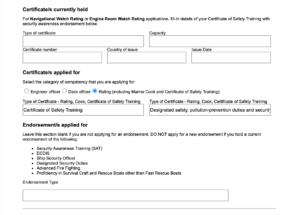
Endorsements applied for
Leave this section blank. The form itself says to leave it blank if you are not applying for an endorsement — endorsements relate to higher-level qualifications like Ship Security Officer, ECDIS and Advanced Fire Fighting, not to your CoST.
Payment summary
Once your selections are made, the form displays your fee — for the Certificate of Safety Training this shows as “Designated safety, pollution-prevention duties and security duties: $112” (current at the time of writing). You don’t pay online if you’re in Australia — you pay this at Australia Post when you lodge. A tax invoice is issued once your application has been processed.
Downloading and printing
Once every section is complete, the “Download PDF” button (top right of the form) becomes available — click it. If any details are missing, the form will prompt you to add them before it lets you download.
Once the PDF has downloaded, check every detail carefully, and make sure the checklist has been generated with your form. If everything is correct, print the form. If you spot a mistake, correct it online and download the form again — never hand-correct a printed form.
Do NOT sign the form yet
This one catches people out: the form includes specimen signature boxes that are digitally imaged onto your AMSA certificate. The form’s instruction is explicit — do not sign until instructed by Australia Post. You’ll sign in front of the Australia Post service person, using a black pen, keeping your signature inside the box. You can see these boxes on the last page of the sample form — notice they’re left empty.
Step 2: Lodge Your Application
If you’re in Australia
Take your printed Form 419, the checklist, copies of your STCW Statement of Completion, and your original ID documents to a participating Australia Post retail outlet. At the counter you will:
- Present your original ID for verification
- Sign the form in front of the Australia Post service person (black pen, inside the boxes)
- Have your photograph taken — this is done at Australia Post at no extra cost
- Pay the application fee
Not every post office handles AMSA lodgements, so check AMSA’s list of participating outlets before you go.
If you’re overseas
Many of our students head straight overseas to chase the Med or Caribbean season — you can still apply for your CoST from anywhere in the world. Overseas applicants must:
- Send only certified true copies of documents
- Include two photographs taken within the previous six months, 45mm x 35mm (not including a border), each certified on the reverse by a certifying officer with the statement “This photograph is a true likeness of (your full name)”, plus the date, and the officer’s full name, signature and title
- Sign in the specimen boxes on the last page of the form
- Email your scanned form and certified true copies to stcw.applications@amsa.gov.au
AMSA will reply with instructions on how to pay the fee through their online portal.
Step 3: Wait for Your CoST
AMSA assesses your application and will decide it within 28 business days from the time they receive a completed application — so an incomplete application is the main thing that slows people down. Applications will not be assessed until all required documentation is received, and AMSA will contact you if anything is missing. This applies whichever route you use.
If you applied through myAMSA, you can track progress in your account and you’ll receive a digital certificate once approved. If you applied using Form 419, AMSA will email you updates using the contact details on your form, and your physical certificate is sent to the delivery address you provided.
Remember: you don’t need to wait for your CoST to start job hunting. Your STCW Statement of Completion is internationally recognised and issued the moment you successfully finish your course — it’s accepted by foreign-flagged vessels and internationally operating superyachts straight away. The CoST is specifically what you need for Australian-flagged commercial vessel work.
How Long Is Your CoST Valid?
Your Certificate of Safety Training is valid for five years. Before it expires, you’ll need to demonstrate continued competence in sea survival and firefighting to revalidate it.
Revalidation is available through both routes. From 18 August 2026 you can revalidate online through myAMSA, which is the simplest option if you have a myID — you’ll have an AMSA ID by then, so log in, upload your continued competence course certificate and submit. Alternatively you can complete Form 419 again, this time selecting “Revalidation of a certificate and/or endorsement” and entering your Seafarer ID and existing certificate details.
Superyacht Crew Academy runs a 1.5-day STCW / AMSA CoST Refresher (Continued Competence) Coursedesigned for exactly this.
Common Application Mistakes to Avoid
Leaving your myID setup to the last minute. If you’re applying online, identity verification can take a day or two if a document doesn’t match. Set your myID and myAMSA accounts up before you finish your course, not the night you want to apply.
Trying to print Form 419 before completing it online. The form must be filled in online first — the Download PDF button only activates once every required field is complete.
Signing the form at home. The specimen signatures are digitally imaged onto your certificate and must be done in front of the Australia Post service person, in black pen, inside the boxes. (Overseas applicants are the exception — they sign before scanning.)
Entering a shortened name. Use ALL given names exactly as they appear on your ID. Your certificate is issued in the name on your ID, and mismatched names require change of name evidence.
Filling in “Certificates currently held”. For your first CoST application this stays blank — it’s only used for Watch Rating applications.
Filling in “Endorsements applied for”. Also blank — endorsements relate to higher-level qualifications.
Bringing original supporting documents. Your course certificates go in as copies — AMSA explicitly accepts no responsibility for lost originals. Only your ID needs to be original.
Lodging without the checklist. Form 419 generates a document checklist based on your selections — don’t proceed without it, and don’t lodge until you have everything on it. Incomplete applications aren’t assessed, and the 28-business-day clock doesn’t start until your application is complete.
Uploading the wrong document. AMSA needs your course completion certificate showing STCW course codes — not a transcript, attendance record or statement of attainment.
Using an unreliable delivery address. If you’re taking the Form 419 route, your physical card is posted to the delivery address on the form — important if you’re about to travel.
Frequently Asked Questions
Can I apply for my CoST online?
Yes. From 18 August 2026, you can apply for or revalidate your CoST through the myAMSA portal. You’ll need a myID Digital ID at Standard identity strength and a myAMSA account. You upload your supporting documents, pay online, and track your application from your account.
Do I need a myID to apply?
Only if you want to apply online. myID is the Australian Government’s secure digital ID app, which lets you prove who you are online using Australian identity documents such as a passport or driver’s licence. If you’d rather not set one up — or you can’t — Form 419 lodged at Australia Post remains available.
Do I still get a plastic card if I apply online?
Applying through myAMSA gets you a digital certificate you can download to your digital wallet. A digital CoST is your official certificate and has the same status as a plastic CoST card, with a QR code employers and inspectors can scan to verify it. If you specifically need a physical card, check current arrangements with AMSA Connect on 1800 627 484 before you apply.
Can I work while I wait for my CoST?
Yes — on internationally operating and foreign-flagged vessels, including superyachts. Your STCW Statement of Completion is issued on course completion and accepted by employers worldwide. The CoST is only required before working on Australian-flagged commercial vessels.
How much does the CoST application cost?
The AMSA fee is currently $112 for the Certificate of Safety Training (Designated safety, pollution-prevention duties and security duties). You pay online if you apply through myAMSA, at Australia Post if you lodge Form 419 in Australia, or through AMSA’s online portal if you’re applying from overseas. Check the AMSA website for the current fee as it may change. Note this is separate from your course fee.
How long does AMSA take to process the application?
AMSA decides applications within 28 business days from receiving a completed application. The most common delay is missing documents — applications aren’t assessed until everything required has been received.
Do I need a medical certificate to apply?
No. A Certificate of Medical Fitness is NOT required for the issue of a Certificate of Safety Training. (You may still want an ENG1 or equivalent medical for superyacht job applications — but that’s an employer requirement, not an AMSA CoST requirement.)
I made a mistake on my form — what do I do?
If you’re using Form 419, go back to the online form, correct the detail, and download a new PDF. Never hand-correct a printed form. If you’re applying through myAMSA, you can correct details before you submit — and if you spot something after submitting, call AMSA Connect on 1800 627 484.
Can I apply for my CoST from overseas?
Yes. myID relies on Australian identity documents, so if you’re already overseas the Form 419 route is the one to use: send certified true copies of your documents, two certified photographs, and your signed, scanned form to STCW.applications@amsa.gov.au. AMSA will respond with instructions for paying the fee online.
Will AMSA accept my STCW course from overseas?
No. AMSA does not accept STCW Reg VI/1 Basic Safety courses completed overseas, or from Australian colleges that aren’t AMSA approved. Make sure you complete your training with an AMSA-approved provider — like the STCW – AMSA CoST course at Superyacht Crew Academy.
Where do I do the CoST course itself?
Superyacht Crew Academy runs the STCW – AMSA Certificate of Safety Training (CoST) course over 5 days from Frenchs Forest, Sydney. Our team can also walk you through the application process — myAMSA or Form 419 — during your course, so you leave knowing exactly what to do.
Ready to Get Started?
The CoST application is straightforward once you know which route suits you and what goes where — and the course is where it all begins.
Download the Sample Form 419 (PDF) to keep beside you if you’re applying the traditional way.
View STCW (CoST) Course Dates
Need to revalidate an existing certificate? View the STCW / CoST Refresher Course
Ready to Get Started?
The CoST card process is straight forward once you know what goes where — and the course is where it all begins.
Download the Sample Form 419 (PDF) to keep beside you while you apply.
Need to revalidate an existing certificate? View the STCW / CoST Refresher Course

)
)